Color Tracking
Following Objects
A child watching a red balloon does not solve a system of equations. The balloon drifts behind a tree, reappears, tumbles, catches the light from a new angle, and the small head turns to follow it the whole time. No template. No memory of the balloon's exact shape. Just one stubborn rule: keep your eyes on the red thing.
That rule is older than computers and almost embarrassingly cheap to run. Strip away texture, edges, gradients, and deep nets, and a surprising amount of "follow that object" survives on a single cue: color.
Before you track anything clever, learn to track the simplest thing reliably: a patch of a color that nothing else in the frame happens to share.
The trick is not "look for red pixels." It is choosing a way to describe color that survives the real world: a passing cloud, a flickering bulb, a shadow sliding across the object. We do that by switching the language we use to talk about color, then drawing a fence around the region of that language our object lives in. The fence is called a color threshold, and everything else in this chapter is just cleaning up after it.
Drag the hue range and the saturation/value thresholds below until the mask isolates one color and nothing else. Watch what happens to the white blob when you widen the hue too far: the background leaks in. Then tap 📷 Camera, point it at a brightly colored object, and walk it into shadow. Notice the mask holding (or not).
What you just felt is the whole game. A loose fence catches the object but also the carpet; a tight fence drops the object the instant the light shifts. Color tracking is the art of placing that fence in a color space where lighting moves the object as little as possible. That space, almost always, is HSV.
The mask itself is a per-pixel test. A pixel survives if all three of its HSV channels fall inside the chosen bounds:
Here is the binary mask (white where the object is, black elsewhere). , , are the hue, saturation, and value of the pixel at . The six bounds with subscripts and are the sliders you just dragged: the lower and upper walls of the fence on each channel. The symbol means logical AND, so a pixel must clear all three tests at once to count.
Why HSV beats RGB for color
In RGB, a single real-world color is smeared across all three channels at once. A red apple in bright sun and the same apple in shade are both "red" to your eye, yet their RGB triples can be wildly different, because dimming the light scales red, green, and blue together. You cannot draw a tidy box around "red" in RGB without it being either too greedy or too timid.
HSV untangles this. It splits color into three intuitive axes: Hue is the color itself (red, orange, cyan), Saturation is how pure or washed-out it is, and Value is how bright it is. The payoff is that turning the lights down mostly moves a pixel along the Value axis while leaving Hue almost untouched. So you can fence "red" with a narrow band of Hue and let Value roam, and your fence survives shadows.
In OpenCV the ranges are quirky for a practical reason: Hue is stored in – (degrees halved, so the full color wheel fits in a single byte), while Saturation and Value run –.
From mask to motion: the tracking pipeline
A mask is a snapshot. Tracking is what turns a sequence of masks into a moving point. The classic color pipeline is five steps that repeat every frame:
- Convert the frame from RGB to HSV.
- Threshold with the HSV fence to make a binary mask.
- Clean the mask with morphology (next section).
- Find contours in the mask, the closed outlines of the white blobs.
- Pick the largest contour as the object and report its center.
The object's position is the centroid of that winning blob, computed from image moments:
is the zeroth moment, literally the count of white pixels (the area). and are the first moments, the sums of the and coordinates of those pixels. Dividing the coordinate-sum by the pixel-count gives the average position: the blob's balance point. Draw a crosshair there and you have a tracker.
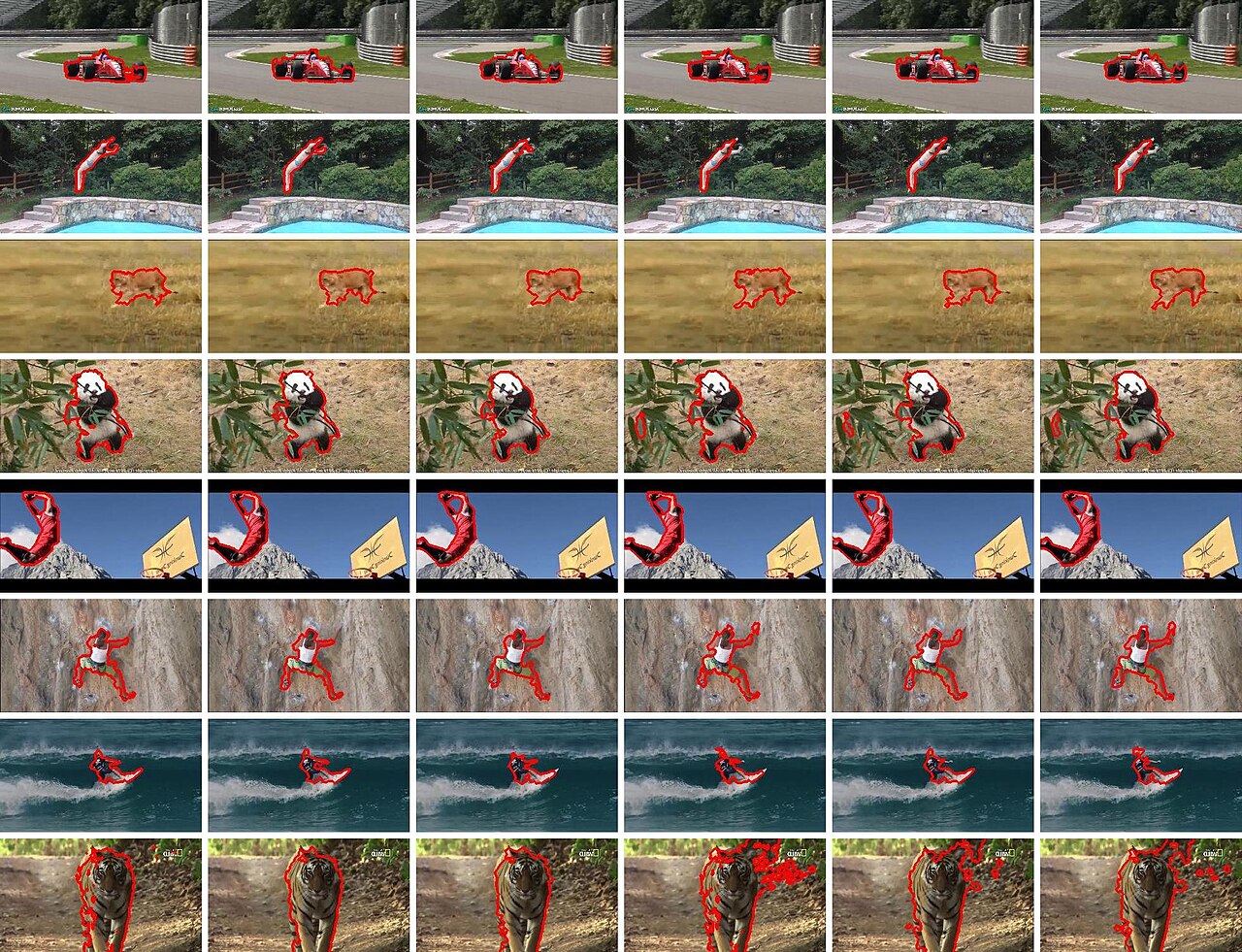
The image above this chapter is a vivid illustration of the harder cousin of this problem. Each row is a single subject (a Formula 1 car, a snake, a panda, a surfer, a tiger) located across six frames, its silhouette traced in red. Color alone could lock onto the panda's white or the car's scarlet, but the snake against foliage and the tiger against tall grass show exactly where pure color cues break down.
Cleaning the mask with morphology
Thresholding is never tidy. A real mask is freckled with stray white specks (sensor noise, glints) and pocked with black holes (a specular highlight on the object that read as "too bright"). Morphological operations scrub this up using a small sliding window called a structuring element.
The two primitives are erosion and dilation. Erosion shrinks white regions, eating away their borders and so deleting tiny specks. Dilation grows white regions, swelling them to fill small pinholes. Chaining them yields the two workhorses:
- Opening is erosion then dilation: it removes small noise but restores the object to roughly its original size.
- Closing is dilation then erosion: it fills holes inside the object without bloating its outline.
A typical color tracker does an open-then-close: kill the speckle, then heal the holes, and the blob you finally hand to the contour finder is one clean island instead of an archipelago.
Where color tracking breaks
Color is cheap, and cheap has a price. Four failure modes haunt every color tracker:
- Two of the same color. A second red object in frame and the "largest blob" rule flips between them, or worse, they merge into one phantom centroid halfway between.
- Lighting drift. A cloud passes, the auto-exposure kicks in, and the hue you fenced is now just outside the wall. The mask blinks out.
- Occlusion. The object slips behind something. The blob vanishes, the area drops to zero, and the centroid is undefined until it reappears.
- A matching background. Point a green tracker at a lawn and everything is "the object."
The professional answer is not to abandon color but to fuse it with other cues, motion, shape, a learned appearance model, so that no single failure sinks the track.
For the advanced reader → The full moment math behind the centroid and the object's tilt
The raw image moment of order over the binary mask is a weighted sum over every pixel:
Setting gives , the total white area. The centroid follows from the first moments as shown earlier, .
To recover the object's orientation, shift to central moments, which measure spread about the centroid and so are translation invariant:
The blob's tilt angle is then read off the second-order central moments:
where and are the variances along and , and is the covariance. With , the area , and , you have not just where the object is but how big it appears (a crude depth cue, since area shrinks with distance) and which way it is turned, all from summing over the very mask the sliders produced.
Key takeaways
- Switch color spaces first. RGB tangles lighting into every channel; HSV isolates the color itself in Hue so your fence survives shadows and bright spots.
- The mask is a per-pixel AND of three range tests on Hue, Saturation, and Value. The sliders are literally the six walls of that fence.
- Red wraps the hue seam, so it needs two ranges (near and near ) OR-ed together. This is the single most common color-tracking bug.
- Morphology cleans the mask: opening kills speckle, closing fills holes, and the result is one clean blob whose centroid is the tracked point.
- Color alone is brittle against duplicate colors, lighting drift, occlusion, and matching backgrounds. Real systems fuse it with motion, shape, or histogram methods like mean shift.
The child never stops watching the red balloon, and neither does the machine, as long as nothing else in the room is red. We started with a single stubborn rule, keep your eyes on the colored thing, and found it hiding inside three comparisons per pixel, a fence in a kinder color space, and a little arithmetic on where the white blob balances.
It is the humblest tracker there is, and that is exactly why it matters: every grand vision system, somewhere near the bottom, is still just following a color it decided to care about.